

ChatGPT for Android might soon enable quicker access to specific chats.
A new shortcut feature is being tested, which could simplify interactions by reducing the number of taps needed each time.
OpenAI seems to be trialing a function that would facilitate quicker access to ongoing conversations: shortcuts for ChatGPT on Android that allow users to directly open a specific thread from their home screen.
Android Authority identified this change through an APK analysis of ChatGPT for Android version 1.2025.350. Within this version, an "Add to home screen" option appears in the chat menu, indicating that OpenAI is exploring a quicker method to return to frequently utilized chats.
If you frequently access a particular thread for daily tasks, long-term projects, or repetitive prompt sequences, this minor user interface adjustment could aid in saving time each day.
Location of the option
The APK analysis indicated that you can find this feature in the three-dot menu within a specific chat. By selecting "Add to home screen," Android will generate a launcher shortcut that functions similarly to a typical app icon, but is directed specifically to that conversation.
Currently, the shortcut name is automatically derived from the chat title, and there is no option to change it during the setup process. The feature appears to allow for an unlimited number of chat shortcuts, with the expectation that selecting one will directly open the chat instead of routing through the app first.
Advantages of shortcuts over pinning
While ChatGPT already permits pinning conversations within the app (and on the web), which is helpful once you are within ChatGPT, a home screen shortcut alters the entry point. It converts your most essential chats into destinations that can be accessed with a single tap from the launcher.
This distinction is significant if you repeatedly use the same thread for regular tasks such as planning, writing, or tracking ongoing activities. Instead of searching, scrolling, or depending on pinned chats within the app, you can simply tap the icon and continue.
Expected timeline for availability
This seems to be a test feature rather than one that can be activated by all Android users at present. Android Authority mentions that it is not widely available yet, although it can be made functional with some adjustments, and there is no announced public release date.
If it becomes available more broadly, the practical details to monitor include whether OpenAI introduces a renaming option, if any limitations arise, and whether the shortcut consistently opens the correct chat each time. Until then, the best strategy is to keep your important threads organized within the app and stay tuned for future Android updates that may include the "Add to home screen" menu item.




Other articles
 Your upcoming Legion Go 2 could operate on SteamOS rather than Windows 11.
According to a report, Lenovo is expected to reveal a Legion Go 2 variant running SteamOS at CES 2026, featuring the Ryzen Z2 Extreme and an 8.8-inch 144Hz OLED display, while eliminating the Windows 11 obstacles for gamers.
Your upcoming Legion Go 2 could operate on SteamOS rather than Windows 11.
According to a report, Lenovo is expected to reveal a Legion Go 2 variant running SteamOS at CES 2026, featuring the Ryzen Z2 Extreme and an 8.8-inch 144Hz OLED display, while eliminating the Windows 11 obstacles for gamers.
 Is your TV wall mount no longer functioning? Displace Hub aims to demonstrate this at CES.
Displace Hub makes its entrance at CES 2026 with an audacious promise: to mount “any TV” in less than 10 seconds, without the need for drilling or cables. The true evaluation will focus on battery life, compatibility with walls, and durability over time.
Is your TV wall mount no longer functioning? Displace Hub aims to demonstrate this at CES.
Displace Hub makes its entrance at CES 2026 with an audacious promise: to mount “any TV” in less than 10 seconds, without the need for drilling or cables. The true evaluation will focus on battery life, compatibility with walls, and durability over time.
 Instagram now restricts you to a maximum of five hashtags for each post.
Instagram is enforcing restrictions on hashtag spamming by allowing only five hashtags per post.
Instagram now restricts you to a maximum of five hashtags for each post.
Instagram is enforcing restrictions on hashtag spamming by allowing only five hashtags per post.
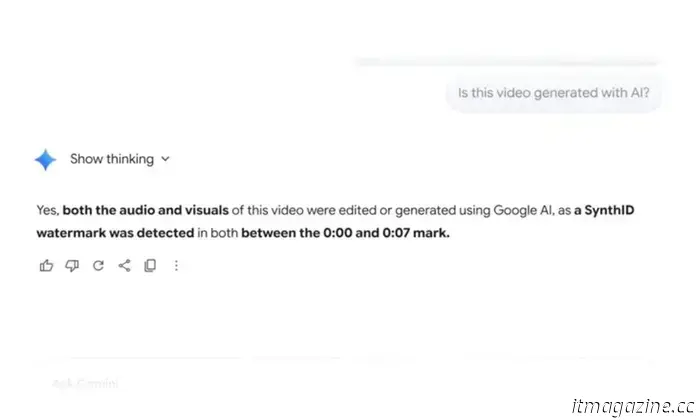 Gemini can now assist you in identifying videos created by AI.
Google is enhancing Gemini's AI content detection features to cover video content as well.
Gemini can now assist you in identifying videos created by AI.
Google is enhancing Gemini's AI content detection features to cover video content as well.
 Apple's foldable iPhone appears to be short and wide, which might make it difficult to fit in your pocket.
A leak from iPhone-ticker.de suggests that Apple's foldable iPhone will be compact and wide when closed, potentially altering how it fits into pockets. CAD measurements also indicate an interior reminiscent of a mini tablet.
Apple's foldable iPhone appears to be short and wide, which might make it difficult to fit in your pocket.
A leak from iPhone-ticker.de suggests that Apple's foldable iPhone will be compact and wide when closed, potentially altering how it fits into pockets. CAD measurements also indicate an interior reminiscent of a mini tablet.
 Samsung's latest Exynos 2600 intends to tackle your issues regarding the Exynos-equipped Galaxy S26 models.
Samsung has officially unveiled its newest flagship chipset, the Exynos 2600, along with its important specifications.
Samsung's latest Exynos 2600 intends to tackle your issues regarding the Exynos-equipped Galaxy S26 models.
Samsung has officially unveiled its newest flagship chipset, the Exynos 2600, along with its important specifications.
ChatGPT for Android might soon enable quicker access to specific chats.
ChatGPT for Android might soon include home screen shortcuts for particular conversations. An analysis of the APK indicates that OpenAI is experimenting with an "Add to home screen" feature that directly opens a selected chat.