

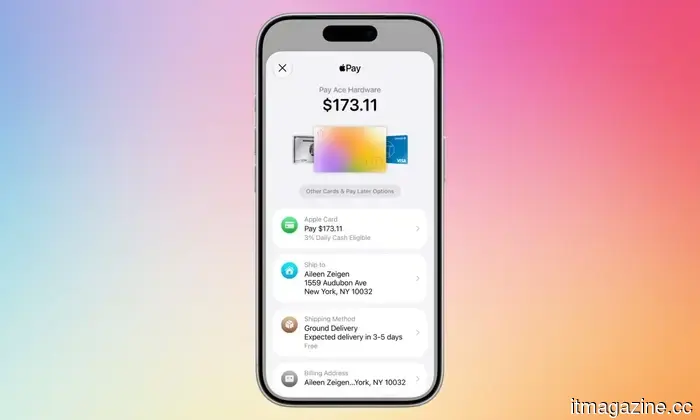
The Apple Pay update in iOS 27 will eliminate the need for you to search for the correct card before making a purchase.
A small update for Apple Pay that was overdue.
Whenever you complete a purchase using Apple Pay and try to switch cards by tapping on the card displayed in the payment sheet, it often leads to confusion. In iOS 26, this tap doesn't change your card. Instead, it opens a screen for editing your address. The actual button for switching cards is located elsewhere, near the bottom of the screen, and can be easily overlooked. If you've ever struggled with Apple Pay during checkout and wondered what was happening, Apple has addressed this issue in iOS 27.
So, what was the issue with Apple Pay's card switching feature?
Tapping on the card itself seemed like a natural action, but it didn’t work well with Apple Pay. This confusion sometimes led users to pay with the wrong card. For example, someone wanting to switch from a debit card to a rewards card would tap the card, end up on the address editing screen, navigate back, and repeat the process, ultimately paying with whatever card was initially selected. As Apple Wallet accommodates debit cards, credit cards, and pay later accounts, this flaw became more apparent over time.
What changes have been made to the Apple Pay checkout process?
With iOS 27, users can now swipe between cards on the main Apple Pay sheet, matching the gestures they were already attempting. Tapping a card will open a grid view displaying all eligible cards. The new layout also provides details such as rewards, account balances, and pay later options, allowing users to compare before making a payment. Although merchants and developers still dictate what information appears, the Apple Pay checkout page in iOS 27 is significantly clearer and improved compared to iOS 26.
For context, this card switching enhancement is a minor part of a larger Apple Wallet initiative stemming from WWDC 2026, which also includes features like bill splitting via Apple Cash using Visual Intelligence, converting physical loyalty and membership cards into digital Wallet passes, and an enhanced hotel key experience featuring trip information and activity updates.
For over five years, Shikhar has effectively summarized advancements in consumer technology and shared insights…
These seven hidden features in iOS 27 have subtly enhanced my iPhone experience.
Rather than focusing solely on significant features, these seven minor changes are the ones you'll likely notice in your daily routine. Each iOS update typically showcases several headline features that attract the most attention. However, it’s often the less glamorous tweaks that have the most considerable impact on my everyday life. iOS 27 is filled with these small improvements, and after testing the beta version, I've identified seven that have already made my daily experience better.
Connectivity Assist helps keep me online.
Honor Magic V6 review: I was skeptical about this sleek foldable, but it exceeded my expectations.
Honor's latest foldable device sets new standards in durability, battery life, and camera quality, though its crease and unusual performance design prevent it from being perfect.
Quick review: Apple has finally dispelled the rumors of planned obsolescence.
If you've been using an older iPhone, iOS 27 is an uncommon update that rewards you for it.
Every time Apple releases a new iOS update, users claim their iPhones suddenly seem slower. This rumor has persisted for years, and although Apple has always denied it, the suspicion lingered. With the release of iOS 27, I believe Apple has finally put these rumors to rest.
I installed the beta on my iPhone Air, but the more compelling story comes from users with older models. Reports from those using iOS 27 on older iPhones suggest their devices feel faster, not slower.






Other articles
 Skoda's Peaq is a seven-seat electric SUV that is priced significantly lower than the Kia EV9.
The Skoda Peaq flagship SUV, which features seven seats, a 600km range, and V2H charging, is priced starting at approximately €50,000, making it less expensive than the Kia EV9 and Hyundai Ioniq 9 by notable amounts.
Skoda's Peaq is a seven-seat electric SUV that is priced significantly lower than the Kia EV9.
The Skoda Peaq flagship SUV, which features seven seats, a 600km range, and V2H charging, is priced starting at approximately €50,000, making it less expensive than the Kia EV9 and Hyundai Ioniq 9 by notable amounts.
 You might get your first glimpse of the Steam Machine in just a few days.
According to a new leak, Steam Machine reviews may be published after June 23, and the console includes some unexpected features.
You might get your first glimpse of the Steam Machine in just a few days.
According to a new leak, Steam Machine reviews may be published after June 23, and the console includes some unexpected features.
 NHS England launches Microsoft 365 Copilot for 505,000 employees in the largest implementation of AI in healthcare.
NHS England is providing 505,000 clinicians and staff with access to Microsoft 365 Copilot following a trial involving 30,000 participants, which indicated an average time saving of 43 minutes per day.
NHS England launches Microsoft 365 Copilot for 505,000 employees in the largest implementation of AI in healthcare.
NHS England is providing 505,000 clinicians and staff with access to Microsoft 365 Copilot following a trial involving 30,000 participants, which indicated an average time saving of 43 minutes per day.
 Fable 5 compared to GPT 5.5: Anthropic's model excelled in every benchmark, but then was withdrawn by the government.
Anthropic's Fable 5 outperformed OpenAI's GPT 5.5 in every significant AI benchmark before a US export control directive took it offline just three days after its release.
Fable 5 compared to GPT 5.5: Anthropic's model excelled in every benchmark, but then was withdrawn by the government.
Anthropic's Fable 5 outperformed OpenAI's GPT 5.5 in every significant AI benchmark before a US export control directive took it offline just three days after its release.
 In the first quarter of 2026, grassroots organizations halted 75 data center projects valued at $130 billion.
Opposition to data centers has surged to 833 groups in 49 states in the US, which have either halted or postponed 75 projects valued at $130 billion in just three months, matching the total for all of 2025.
In the first quarter of 2026, grassroots organizations halted 75 data center projects valued at $130 billion.
Opposition to data centers has surged to 833 groups in 49 states in the US, which have either halted or postponed 75 projects valued at $130 billion in just three months, matching the total for all of 2025.
 Spotify has taken down 57,000 counterfeit podcast episodes that were promoting the sale of illegal drugs following pressure from Congress.
Spotify removed 57,000 fraudulent podcast episodes and 3,500 accounts that were promoting illegal drugs following a US Senate inquiry that highlighted the extent of the issue.
Spotify has taken down 57,000 counterfeit podcast episodes that were promoting the sale of illegal drugs following pressure from Congress.
Spotify removed 57,000 fraudulent podcast episodes and 3,500 accounts that were promoting illegal drugs following a US Senate inquiry that highlighted the extent of the issue.
The Apple Pay update in iOS 27 will eliminate the need for you to search for the correct card before making a purchase.
Apple has revamped the Apple Pay checkout, allowing you to switch cards just by tapping on them, at last.