
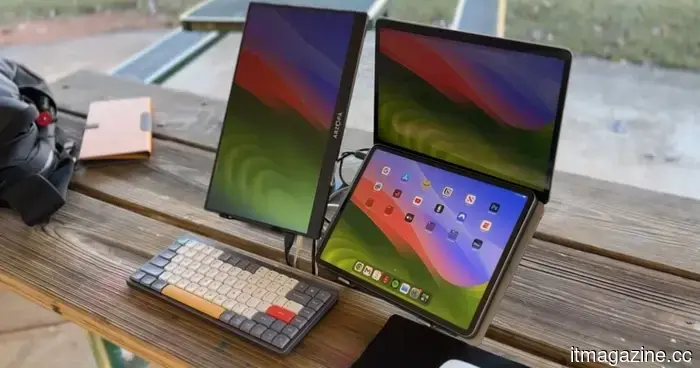
Why I have mixed feelings about portable monitors, despite my strong desire to have one.
I’ve been traveling more lately, which means I've also been engaging in the worst kind of pre-trip calculations: the kind where I convince myself that I can pack lighter by adding more accessories. Before one significant trip, I found myself pondering what I could take so I wouldn’t need my laptop. A tablet? A keyboard? Some small hub? Then, for some reason, a portable monitor popped into my mind.
That’s a rather absurd thought. A portable monitor is essentially half a laptop, lacking the part that makes it independently functional. Yet, this category is becoming increasingly appealing. You can now find slim USB-C displays, touchscreen options, 4K travel screens, and magnetic setups designed for remote work.
Why the idea seems logical
I wish I could dismiss this idea as nonsense, but it does make sense. I use a secondary screen at home because it makes my day less unbearable. One display holds the draft, while the other displays notes, Slack, browser tabs, screenshots, or anything else I’m pretending not to be distracted by. That arrangement genuinely facilitates my work.
So, when companies advertise travel screens as tools for productivity, I understand. There are portable monitor models with USB-C connections, touchscreen capabilities, and systems compatible with laptops, tablets, and phones. Espresso’s 15.6-inch 4K Pro display even markets itself as a serious companion for remote work, not just a novelty screen for those who dislike packing lightly.
I notice the ads influencing me more quickly than I prefer. My laptop is already designed for portable work, yet as soon as I envision writing, editing, and managing notes while on the road, one screen starts to feel too confining.
Why the setup becomes problematic
However, it all becomes less streamlined once the equipment is actually on a table. The monitor requires a sleeve to prevent scratches. It needs that one cable I’ll inevitably misplace at the most inconvenient moment. It may need a stand, a magnetic mount, a hub, and enough space on the table to avoid the setup resembling a small product demonstration nobody asked for.
That’s where the vision starts to get odd. A hotel desk or a café table turns into a workspace. An airport lounge becomes the setting where I realize I’ve recreated the desk I thought I was trying to escape.
I don’t want to be overly critical, as the need for this setup is genuine. Developers, video editors, spreadsheet users, and writers with too many tabs can all make a convincing case for having more screen space. I count myself among them. I just can’t pinpoint when “working anywhere” transitioned into “bringing enough equipment to make every location feel like work.”
Why I still desire one
Portable monitors disturb me because they normalize the gradual accumulation of gear. One more screen. One more cable. One more pouch in the bag. None of it seems excessive in isolation, which is how this compact travel setup infiltrates my routine.
The same trend is occurring across the broader travel-work ecosystem. Laptop screen extenders, folding keyboards, wireless display adapters, compact docks, and desk-to-bag accessories all claim to simplify work. Yet they subtly elevate the expectations for what being “ready to work” entails.
I still want one, albeit reluctantly. I can already envision utilizing an extra display in a hotel room and feeling a brief sense of superiority before realizing I’ve constructed a smaller, inferior version of my home workspace.
I feel the most frustration towards portable monitors when I confront the reality of them. They’re absurd, somewhat disheartening, and probably useful enough that I would still find space for one regardless.

Other articles
 Microsoft will allow users to turn off the floating Copilot button in the Office application.
In the final week of May 2026, Microsoft is releasing an Office update that enables users to relocate the floating Copilot button from their documents back to the ribbon.
Microsoft will allow users to turn off the floating Copilot button in the Office application.
In the final week of May 2026, Microsoft is releasing an Office update that enables users to relocate the floating Copilot button from their documents back to the ribbon.
 SpaceX's IPO documentation uncovers a contradiction in Musk's clean energy stance, as xAI consumes gas while Tesla markets solar energy.
xAI invested $2.8 billion in gas turbines, whereas Tesla markets solar panels. SpaceX's S-1 proposes space-based solar as a solution, but the calculations don’t seem to align just yet.
SpaceX's IPO documentation uncovers a contradiction in Musk's clean energy stance, as xAI consumes gas while Tesla markets solar energy.
xAI invested $2.8 billion in gas turbines, whereas Tesla markets solar panels. SpaceX's S-1 proposes space-based solar as a solution, but the calculations don’t seem to align just yet.
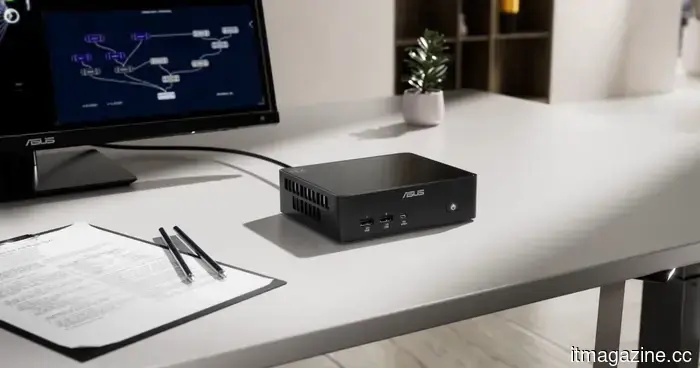 Mini PCs are the most intriguingly dull computers available for purchase.
Mini PCs may not be glamorous, but that’s exactly what makes them feel refreshing in a market saturated with pricey laptops, overly robust towers, and computers that strive too hard for attention.
Mini PCs are the most intriguingly dull computers available for purchase.
Mini PCs may not be glamorous, but that’s exactly what makes them feel refreshing in a market saturated with pricey laptops, overly robust towers, and computers that strive too hard for attention.
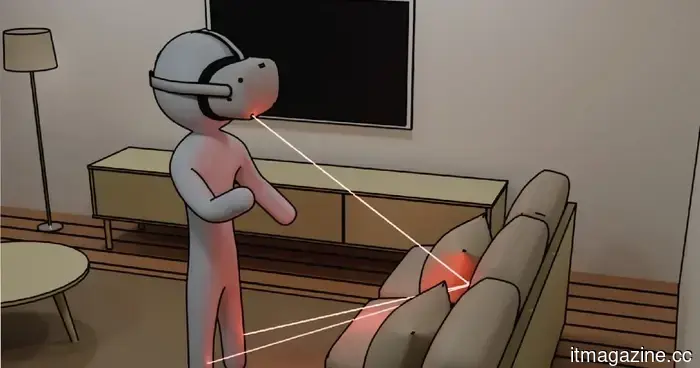 The LiDAR sensor on your iPhone may soon enable you to see around corners.
Researchers at MIT have shown that consumer-level LiDAR sensors can identify and monitor objects that are situated around corners. The equipment is priced at less than $50, and the software is already accessible to the public.
The LiDAR sensor on your iPhone may soon enable you to see around corners.
Researchers at MIT have shown that consumer-level LiDAR sensors can identify and monitor objects that are situated around corners. The equipment is priced at less than $50, and the software is already accessible to the public.
 Valorant's anti-cheat has rendered certain pricey cheat hardware ineffective.
Riot has provided details on how the latest Vanguard update addresses DMA-based cheating hardware by strengthening memory protections at the hardware level. While this enforcement may deter sophisticated cheaters, it has also sparked concerns regarding potential overreach in anti-cheat measures.
Valorant's anti-cheat has rendered certain pricey cheat hardware ineffective.
Riot has provided details on how the latest Vanguard update addresses DMA-based cheating hardware by strengthening memory protections at the hardware level. While this enforcement may deter sophisticated cheaters, it has also sparked concerns regarding potential overreach in anti-cheat measures.
 Microsoft will allow users to turn off the floating Copilot button in the Office application.
In the final week of May 2026, Microsoft will be releasing an Office update that allows users to relocate the floating Copilot button from their documents back to the ribbon.
Microsoft will allow users to turn off the floating Copilot button in the Office application.
In the final week of May 2026, Microsoft will be releasing an Office update that allows users to relocate the floating Copilot button from their documents back to the ribbon.
Why I have mixed feelings about portable monitors, despite my strong desire to have one.
I’d like to poke fun at portable monitors, but the frustrating reality is that they actually have their merits. That might be the most unfortunate aspect of them.